
Invoice Simple: Invoice Maker
Invoice SimpleBusiness
4.822.06K Reviews
- Version
- 6.10.0
- Installs
- 5.00M
- Age Rating
- Everyone
Screenshots
Our Review of Invoice Simple: Invoice Maker
 Analysis by Appyee
Hey there! If you're like me, juggling multiple projects and clients, you know how crucial it is to stay on top of invoicing. That’s where Invoice Simple: Invoice Maker comes into play. I recently gave it a whirl, and let me tell you, it’s a game changer for anyone needing to streamline their billing process.
Before You Send the First Bill
I find it helps to treat setup as a small business task rather than something to rush through between jobs. Have your business name and contact details ready, and decide how you want your work described before entering it. A clear, consistent identity makes a bill easier for a client to recognize later, especially if you are sending it after a busy day on site. Adding a logo can help with that polished appearance, but it is worth checking that it looks legible rather than forcing a design that becomes cramped.
Think through your usual billing pattern, too. A freelancer who charges for a handful of distinct services has different needs from a contractor who bills for materials and labor on one job. Preparing a short list of common descriptions and prices can reduce typing and help prevent small inconsistencies between invoices. I would still review each line before sending: a convenient template does not know whether a particular client agreed to a different rate or scope.
Invoice Simple is a business app from Invoice Simple, and it is free to install. Its average rating is 4.8 from around 165,000 ratings, while more than 5 million installs suggest it has found a substantial audience among people who need straightforward billing. It is rated for Everyone, and the app’s current version is 5.11.1. In-app purchases range from $4.99 to $323.99 per item, so I would check the available plans and costs in the app before building a workflow around paid options.
Getting Started with Ease
One of the first things I noticed was how easy it was to set up. Downloading and installing Invoice Simple was a breeze on both Android and iOS. Once you open it, you’re greeted by a clean interface that doesn’t make you feel overwhelmed. I mean, who needs more stress, right?
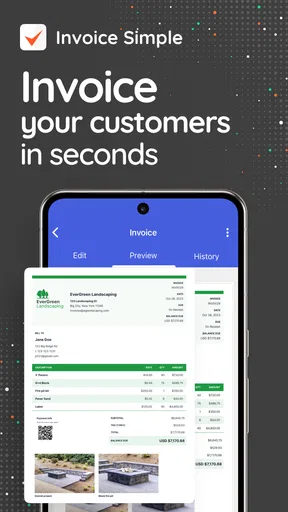
Setting up your account is straightforward. You can quickly add your business details, including your logo, which gives your invoices that professional touch. I appreciated how the app walks you through the setup process without any hiccups.
Getting Unstuck When Setup Feels Awkward
If the first invoice looks less polished than expected, I would check the basics before rebuilding it from scratch: confirm that the business details are spelled correctly, make sure the description is specific enough for the client, and look at the finished document as a recipient would. A business name that is too long or a logo that does not sit well in the chosen layout can make a simple bill feel unfinished. Small corrections at this stage are easier than sending a clarification afterward.
Another useful habit is to separate the invoice’s essential information from optional presentation choices. The client needs to understand what the charge covers and how much is due; decorative touches should support that clarity, not compete with it. I would also settle on a consistent way to name similar services. That makes it easier to scan old invoices when a customer asks what a previous charge covered.
Creating Invoices on the Go
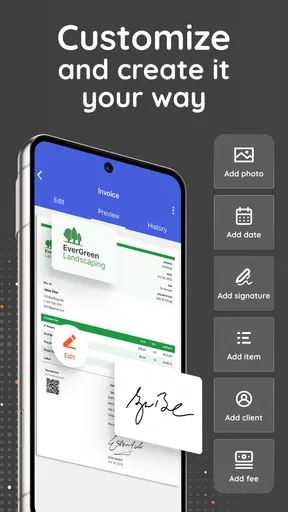
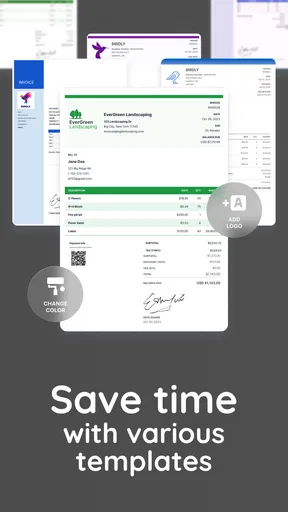
What I love about this app is the ability to create invoices anytime, anywhere. Whether you’re at a coffee shop or in between meetings, you can whip up an invoice in seconds. The app offers several templates, and let me tell you, they look super sleek. You can customize them to include all the necessary details like item descriptions, quantities, and prices.
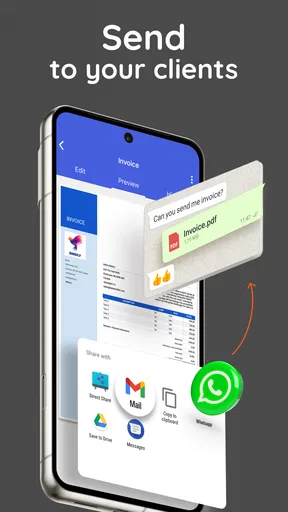
Once you’ve created an invoice, sending it is just as effortless. You can send it via email or text directly from the app, and it even supports PDF format, which is always a plus. I’ve found this feature particularly useful because it means I don’t have to worry about compatibility issues, and I can keep everything digital, which aligns with my eco-friendly mindset.
A Realistic Day-to-Day Workflow
Picture finishing a small repair job just before heading to your next appointment. Rather than relying on a handwritten note that might get lost, you can enter the work while the details are fresh: describe the task, add the agreed charge, check the client information, and review the invoice before sending it. That last pause matters. A quick read-through can catch a mistyped quantity or a vague item description, and it gives you a chance to confirm that the amount matches what you discussed.
For repeat work, I would use a previous invoice as a reference for wording and layout, but I would not assume the next job has identical charges. The time-saving benefit is strongest when you reuse a familiar structure while checking every job-specific detail. It is a useful middle ground between starting from a blank page each time and sending a copy that contains outdated information.
Tracking Payments Made Simple
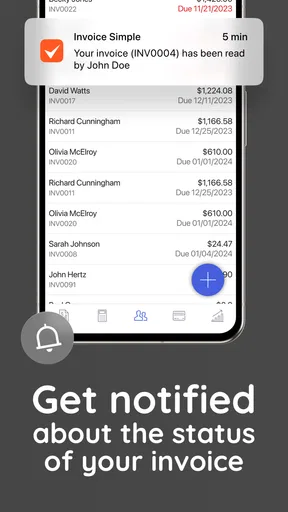
Keeping track of who’s paid and who hasn’t can be a nightmare. But this app makes it incredibly simple. It offers a dashboard where you can see all your invoices, who’s paid, and who still owes you money. And if you’re anything like me, you’ll appreciate the reminders feature that nudges your clients gently when payments are overdue.
Another handy feature is the ability to track expenses. You can log expenses, attach receipts, and even categorize them for easy reference. This feature is golden when it comes time for tax season or if you’re just trying to manage your budget better.
Keeping Records Useful, Not Just Busy
Invoice and expense records only help if they are entered consistently. I would record an expense close to the time it happens, add a receipt while it is easy to find, and use categories in a repeatable way. That gives you a clearer trail when you later need to check a purchase against a project or prepare information for an accountant. It is not a substitute for professional bookkeeping, but it can make the everyday paperwork less scattered.
Payment tracking also works best as a routine rather than an occasional cleanup. After sending a bill, make a habit of checking its status at a regular time, perhaps when reviewing the week’s work. If a payment appears overdue, first confirm the invoice details and the due date you agreed with the client. A polite reminder is more effective when it points to a clear, accurate bill rather than asking the customer to guess what is outstanding.
Additional Features Worth Mentioning
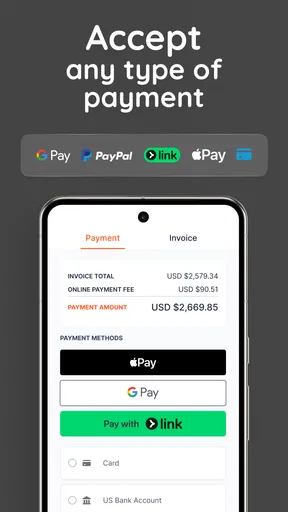
Now, I wouldn’t be doing my job if I didn’t mention some of the other cool features. For instance, you can set up recurring invoices for regular clients, which saves tons of time. Plus, you can accept various payment methods, including credit cards and PayPal, making it convenient for clients to pay you.
The app also offers some robust reporting tools. You can generate reports that give you insights into your earnings, outstanding balances, and more. It’s like having a mini accountant in your pocket.
Where Convenience Has Limits
Recurring billing is most useful when the arrangement really is stable: the same service, on a predictable schedule, with no frequent changes to the amount. If the work varies from month to month, I would rather prepare each invoice individually than risk sending a bill that no longer reflects the agreement. The same caution applies to payment choices. A client may appreciate being able to pay in a familiar way, but the options and any associated costs should be checked before you promise a particular method.
Reports can help me spot unpaid balances and get a broad sense of income, but I would not mistake a convenient overview for a full accounting system. Businesses that need detailed inventory, payroll, complex tax handling, multi-step approvals, or extensive financial reconciliation may be better served by dedicated accounting software. Likewise, if you issue only a bill now and then and already have a reliable system, switching may add another place to maintain records without saving much time.
When a Problem May Be Elsewhere
If a client says an invoice has not arrived, I would not immediately assume the app has lost it. First check that the recipient details are right, then confirm how you sent the document and whether the client can find the message or attachment. Sending a PDF again through a channel the client regularly uses may be a practical fix. Keeping your own record of what was sent and when also helps distinguish a delivery mix-up from a payment delay.
For a slow or confusing workflow, try narrowing down the problem: is it the invoice information, the device, the network connection, or the client’s preferred way of receiving bills? Recheck the details and try again when the connection is reliable. If an issue continues, consult the app’s current help resources rather than repeatedly creating duplicate invoices. That simple pause can prevent two copies of the same charge from reaching a customer.
Who Will Get the Most from It?
I see the strongest fit for independent workers, small service businesses, and people who need to send clear invoices without sitting at a desk. A freelancer finishing a project, a tradesperson billing after a visit, or a consultant who wants a tidy record of client charges can benefit from having invoices, payment status, and expense notes close at hand. The app is particularly appealing when the business has a manageable number of clients and relatively simple billing needs.
Compared with making invoices manually in a word processor or spreadsheet, a purpose-built invoicing app can make repeat tasks feel more organized and keep payment follow-up from getting buried in unrelated files. A spreadsheet may still be the better choice for someone who wants complete control over calculations and records, while a full accounting package makes more sense when invoicing is only one part of a complex operation. I would choose based on the work behind the bill, not just how quickly the first invoice can be made.
The app first appeared on February 1, 2013, and it supports devices running Android 7.0 or later. That makes checking your device’s operating system a sensible first step if installation is a problem. It is free to download, but its in-app purchases mean that “free” should not be read as a promise that every plan or option costs nothing. I would compare the current purchase choices with the features I actually expect to use before committing.
Final Thoughts
In a nutshell, Invoice Simple: Invoice Maker is a lifesaver for freelancers, small business owners, or anyone who needs to manage invoicing without the hassle. It’s user-friendly, efficient, and packed with features that make billing a breeze. Whether you’re tech-savvy or not, this app is designed to make your life easier. So, if you’re looking to up your invoicing game, give it a try. You won’t regret it!
My recommendation comes with one practical qualification: keep your own billing habits disciplined. Review each invoice before sending it, record expenses as they happen, and check recurring charges when a client’s arrangement changes. Those steps make the app more useful and reduce the chance that convenience turns into a correction later.
If your needs are simple and you want to create and keep track of bills while away from a computer, I think it is well worth trying. If your business relies on deep accounting controls or complicated financial workflows, start with a more complete bookkeeping solution instead. For everyday invoicing, though, Invoice Simple offers a straightforward way to get the admin out of the way and return to the work you actually do.
Verdict
Strengths of Invoice Simple: Invoice Maker
- User-friendly interface for quick navigation.
- Customizable templates for professional invoices.
- Supports multiple currencies and languages.
- Integrates seamlessly with payment methods.
- Cloud storage ensures data is synced and safe.
Limitations of Invoice Simple: Invoice Maker
- Limited features in the free version.
- Occasional syncing issues reported by users.
- No offline access without data connection.
- Customer support response can be slow.
- Advanced features require a premium plan.
Similar Picks in This Category
View All
LinkedIn: Community & Network
LinkedIn3.8

Zoom Workplace
zoom.com4.1

Microsoft Teams
Microsoft Corporation4.6

Meta Business Suite
Meta Platforms, Inc.4.6

Webex Meetings
Cisco Systems, Inc.4.5

TeamViewer Remote Control
TeamViewer4.4
Frequently Asked Questions
What features does Invoice Simple: Invoice Maker offer?
Invoice Simple: Invoice Maker provides a comprehensive suite of tools for creating professional invoices quickly. Features include customizable templates, automatic tax calculations, expense tracking, and the ability to send invoices directly from the app. It also allows users to accept payments via credit card or PayPal, streamlining the billing process.
Is Invoice Simple: Invoice Maker available on both Android and iOS?
Yes, Invoice Simple: Invoice Maker is available for both Android and iOS devices. It maintains a consistent user experience across platforms, ensuring that users can manage their invoicing needs seamlessly regardless of their device. You can download it from the Google Play Store or the Apple App Store.
Does Invoice Simple: Invoice Maker offer any subscription plans?
Invoice Simple provides both free and premium subscription plans. The free version includes basic invoicing features, while the premium version offers advanced functionalities such as unlimited invoices, additional templates, and enhanced customization options. Subscriptions are generally offered on a monthly or annual basis.
Can I use Invoice Simple: Invoice Maker offline?
Yes, you can create and edit invoices offline using Invoice Simple. However, to send invoices or sync data across devices, you will need an internet connection. The app stores changes locally and will update your data once the connection is reestablished.
How secure is my data with Invoice Simple: Invoice Maker?
Invoice Simple prioritizes user data security by using encryption protocols for data transmission and storage. Regular updates and privacy policies ensure that your information is protected. Additionally, users are encouraged to enable two-factor authentication for an added layer of security.
